Yes, I’ve finally given into meal planning apps after much resistance. I confess, sometimes, just making it to the grocery store feels like a victory. And while I’d love to spend hours browsing my favorite cookbooks and food blogs before every trip to the store, I don’t always have the luxury. Which leaves me aimlessly wandering the aisles and more susceptible to the lures of frozen meals and junk food. That’s why I’ve started meal planning and looking for whatever help I can get in that department.
While I know there are plenty of online meal-planning services out there, I’ve found that meal-planning apps have become a real life saver for me.
Even if you’ve done absolutely no preparation before you arrive at the supermarket, a great meal planning app will let uyou quickly pick recipes and then create a master grocery list so that you can stay on task (except for some light tabloid reading, if you’d like) and get out as quickly as possible. Yes, please.
Related: Let these 6 great grocery delivery services do the shopping for you.
Paprika Meal Planning App
Unlike some other apps I’ve tried, which have a list of recipes to choose from, Paprika lets you search the entire web so that you can include recipes from your favorite food bloggers and sites. Yay! Once you find a recipe you like, Paprika uploads the ingredients and creates a shopping list organized in sections like dairy, produce, canned goods, etc. Paprika did have trouble pulling in one or two recipes from the web, but for the most part, it was a pretty seamless (and time-saving) experience. ($4.99 iOS, Android, Kindle, Windows, Nook )
Related: An awesome new meal planning website that personalized your meal plans.
Pepperplate Meal Planning App
Pepperplate was probably the most intuitive meal planning app that I’ve tried. No tutorials, no need to google how-to’s — it just makes sense. It’s similar to Paprika in that it also lets you browse recipes from the web, although you have to do that part from your browser rather than the mobile app itself. But if I have time to prep before going to the store, I find it easier to use my laptop to gather recipes anyway, especially since I get a better look at all those gorgeous food photos. (Free, iOS, Android, Windows, Nook)
Related: A meal planning app that puts your kids in charge of planning their own healthy breakfasts.
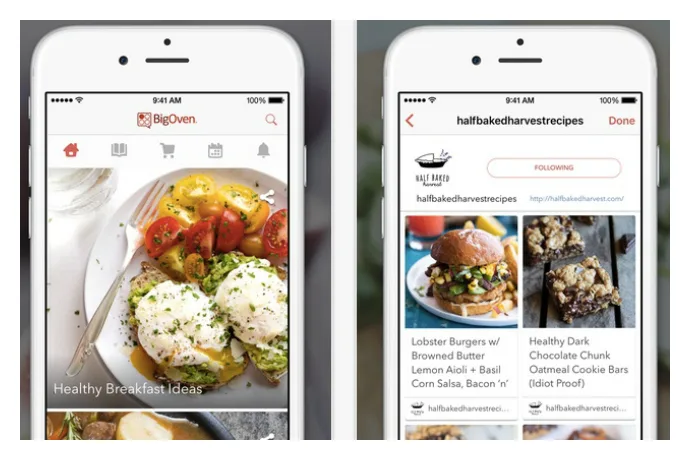
BigOven Recipe App
The BigOven app culls from a set list of recipes, rather than letting you gather them from around the web. However, the library is so massive (350,000+ recipes!) and they’re so well-curated, that I find I’ve been quite content with my options. I also like that it comes with recipe collections that are useful — like camping recipes or grilled desserts — to get the ideas flowing for specific occasions, or when I’m not sure what to make. (Free, iOS, Android, Windows)
Related: The Cool Mom Eats weekly meal plans, with 5 family-friendly recipes.
The Mealboard Meal Planning App
The Mealboard meal planning app offers the most features of the apps that I’ve tried, and can be pretty life-changing if you take the time to set it all up. In addition to letting you import recipes and create a grocery list, it keeps track of every item in your pantry so that you know exactly how many lemons you have, for example — even if you’re not at home to check. This could prevent a lot of duplicate shopping, with the caveat that you need the time to enter all of the information in the first place. That includes entering the prices for each item, which means Mealboard will store them and calculate the total cost of each meal you’re planning so that you don’t have to. This app definitely requires more work on the front end if you want to use all of the features, but when you do, it’s a seriously powerful tool. ($3.99, iOS only)


6 responses to “The 4 best meal planning apps to use on the go. Life savers!”
I would now add to that list Copy Me That. It’s my favorite and super easy to use.
I love using Anylist! https://www.anylistapp.com Like the ability to import recipes from various sites. Can build grocery lists off of the imported recipes. Can also easily build meal plans. I also like the ability to tell Siri to add a specific item to my grocery list!
I really love the https://www.healthykidsinc.com meal planner! It also has a mobile shopping list but the best feature is how it shows me how to grow the foods in all of the recipes…and they have videos for their recipes.
This sounds like such a good one, Sarah. We’ll have to check it out too.
Does anyone know of an app that lets a family ‘collaborate’ on meal planning? I want to be able to access the same calendar and recipe list as my wife.
Picniic on Apple, Google and web